[카테고리:] Crypto Guides

  • OneKey USDT0 to USDC Swap: Gas Error, Sponsored Fee & Result

    OneKey USDT0 to USDC Swap: Gas Error, Sponsored Fee & Result

    OneKey USDT0 to USDC Swap on Arbitrum: Gas Error, Sponsored Fee and What I Actually Received


    Tested: October 29–30, 2026 | Real funds | OneKey App + Hyperliquid

    I started with 445 USDT0 on Arbitrum and wanted to convert it into USDC before using Hyperliquid.

    My first route through CoW Swap failed because the approval step required ETH for gas. I then switched to Binance Web3, where OneKey showed a “Send Free” option during the transaction flow.

    The swap eventually completed through Binance Web3, and I ended up with 444.3212 USDC in my OneKey wallet.

    This is what actually happened — including the gas error, the sponsored fee option, the final amount I received, and how I then connected OneKey to Hyperliquid.

    Note: OneKey labels the token as “USDT” in parts of the swap interface. The asset I used on Arbitrum was USDT0.

    Quick Results

    ItemWhat happened
    Starting amount445 USDT0
    NetworkArbitrum
    Target assetUSDC
    First routeCoW Swap
    First problemInsufficient ETH during approval
    Successful routeBinance Web3
    Sponsored fee“Send Free” appeared during the Binance Web3 flow
    Final balance444.3212 USDC
    Hyperliquid connectionWalletConnect
    Hyperliquid deposit10 USDC tested

    The important distinction is that a swap quote, a sponsored network fee, and the amount you finally receive are not the same thing.


    1. My Test Setup

    I used OneKey as my self-custody wallet to prepare funds for a small Hyperliquid test.

    I already held 445 USDT0 on Arbitrum. Since I wanted USDC for Hyperliquid, I opened OneKey’s swap interface and compared the available routes.

    One useful feature was being able to see different providers and estimated outputs inside the wallet.

    But the route with the best-looking quote was not the route I eventually used.


    2. Comparing USDT0 to USDC Swap Quotes

    One of the first CoW Swap quotes showed approximately 444.5097 USDC for my 445 USDT0.
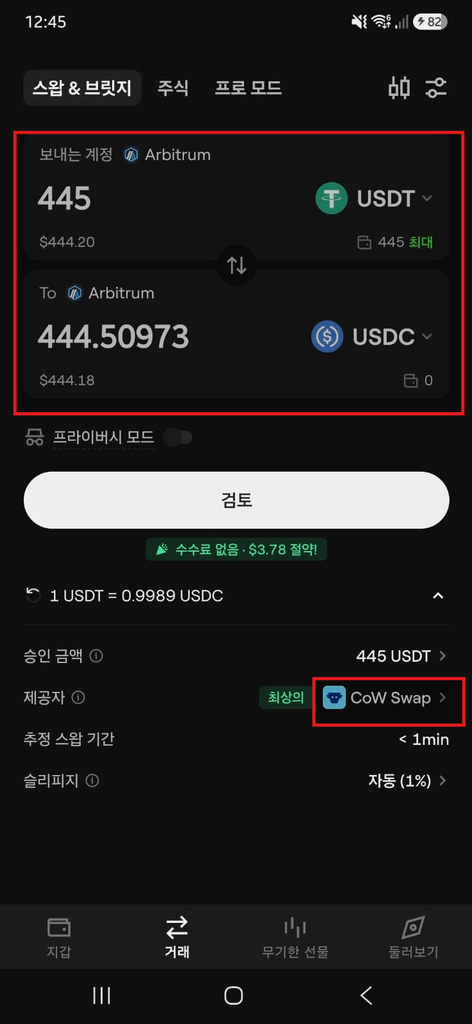
    OneKey showing a CoW Swap quote of approximately 444.5097 USDC for 445 USDT0 on Arbitrum
    Initial CoW Swap quote for converting 445 USDT0 to USDC in OneKey.


    My OneKey app was set to Korean during this test. All screenshots below are original, unedited records of my transactions.


    I opened the order review screen to continue.

    At this point, 444.5097 USDC was only an estimated output. The swap had not been completed.

    That distinction became important almost immediately.


    3. Why Did My OneKey Swap Fail With an Insufficient ETH Error?

    The CoW Swap route failed during the approval step.

    OneKey showed that I did not have enough ETH on Arbitrum to complete the required transaction.
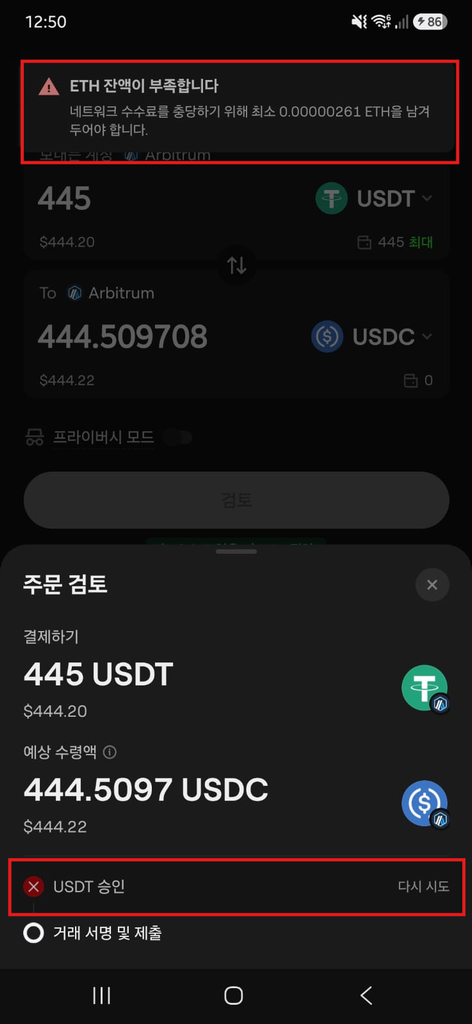
    Error message:
    “Insufficient ETH balance. Keep at least 0.00000261 ETH to cover the network fee.”

    This happened even though I had enough USDT0 for the swap itself.

    The reason is that a token swap can involve a separate on-chain token approval. In my case, that approval required ETH for gas.

    So the problem was not that I lacked USDT0.

    I lacked enough of the network’s native gas token to complete that particular approval flow.

    Rather than adding ETH immediately, I went back and compared another route.


    4. What Does “OneKey Sponsored” or “Send Free” Mean?

    OneKey showed several available providers, including Binance Web3.

    The Binance Web3 route showed an estimated output of approximately 444.4128 USDC.
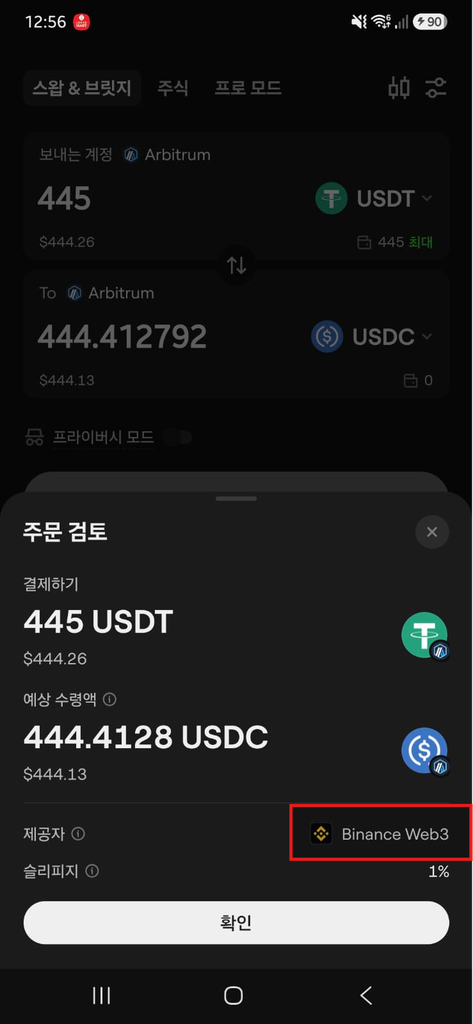
    OneKey showing Binance Web3 as the selected route for a 445 USDT0 to USDC swap on Arbitrum

    I selected that route.

    During the Binance Web3 flow, OneKey displayed a “Send Free” option on the confirmation screen.
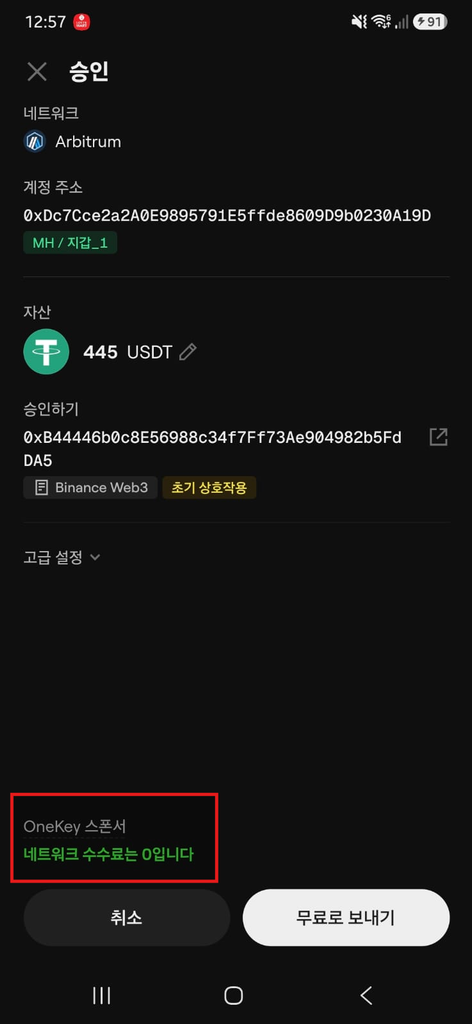
    Screen message:
    “OneKey Sponsored — Network fee: 0. Send Free.”


    Unlike the CoW Swap route I had tried earlier, the Binance Web3 route showed OneKey’s “Send Free” option during the transaction flow.

    This was particularly useful after the earlier ETH gas problem.

    OneKey provides gas sponsorship for certain eligible transactions. When a transaction qualifies, the confirmation screen can show that OneKey is covering the applicable network fee.

    But there is an important distinction:

    Sponsored fee does not mean the entire swap is free.

    The swap can still involve differences caused by the quoted exchange rate, provider fees, price impact, or other execution costs.

    I therefore treated “Send Free” as evidence that the specific eligible network fee shown in that step was sponsored — not as proof that every cost associated with the swap had disappeared.

    Availability can also vary. If the sponsored option does not appear on your own confirmation screen, do not assume OneKey will cover the gas fee.


    5. How Much USDC Did I Actually Receive?

    The swap ultimately completed through Binance Web3.

    I started with:

    445 USDT0

    And after the conversion, my OneKey wallet showed:

    444.3212 USDC
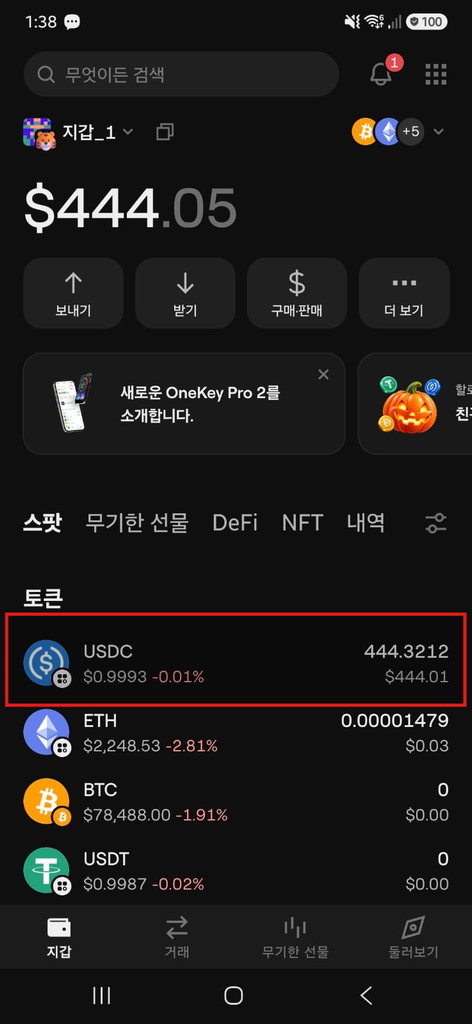
    OneKey wallet showing a final balance of 444.3212 USDC after swapping 445 USDT0 on Arbitrum

    That gives us three different numbers from the same experiment:

    StageAmount
    Starting balance445 USDT0
    Earlier CoW Swap quote~444.5097 USDC
    Binance Web3 quote~444.4128 USDC
    Final OneKey balance444.3212 USDC

    The numerical difference between the starting amount and final balance was 0.6788 tokens, or roughly 0.153% relative to the starting amount.

    But I would not call that a 0.153% OneKey fee.

    USDT0 and USDC are different assets, and the final difference can reflect the exchange rate, route execution, and transaction-related costs.

    The practical lesson is simpler:

    Compare what you send, the live quote, and what actually arrives.


    Try OneKey

    Get 10% Referral Benefits with Code: YKR3EI
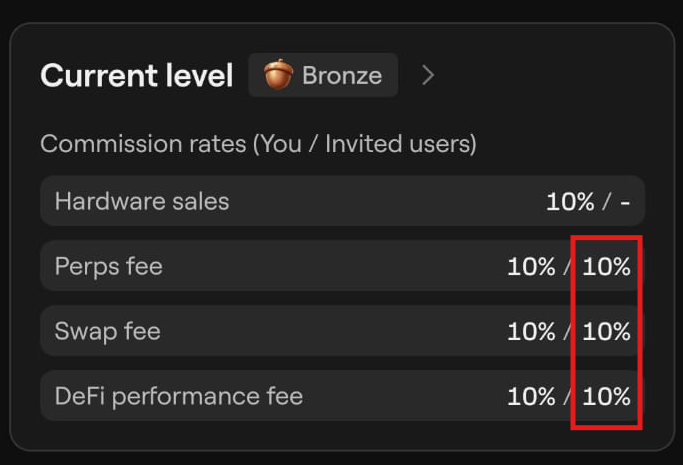
    Download OneKey with My Referral Link

    Referral rates shown in my OneKey app at the time of writing. Terms and rates may change.


    6. Connecting OneKey to Hyperliquid

    Once I had USDC, I moved on to Hyperliquid.

    I traded on the official Hyperliquid interface. OneKey held my keys and handled the wallet approvals.

    On desktop, I selected WalletConnect on Hyperliquid, scanned the QR code with the OneKey app, and approved the connection on my phone.
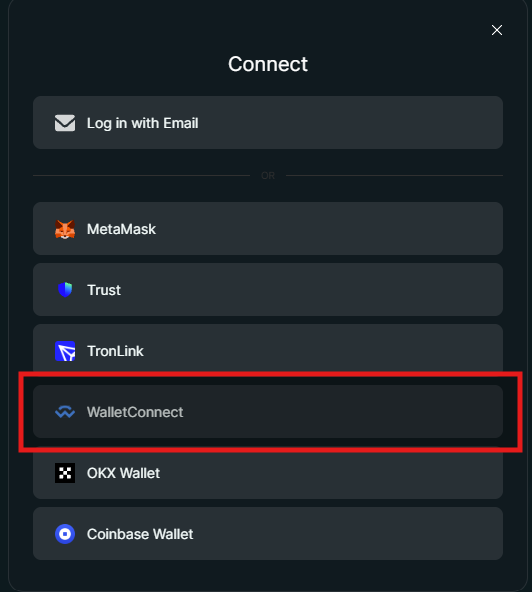
    Hyperliquid desktop WalletConnect screen used to connect the OneKey app by QR code


    Hyperliquid also required me to enable trading through a wallet signature.

    A signature is not automatically the same thing as sending funds, but that does not mean every signature request should be approved blindly.

    Read what the wallet is asking you to sign, especially when a request involves token permissions, contract interactions, or transfers.

    And never enter your recovery phrase into a trading website.


    7. Depositing USDC Into Hyperliquid

    I deliberately used a small amount for the test rather than sending my entire balance.

    Before depositing, check the route and minimum shown in the current Hyperliquid interface. Deposit methods have changed over time, and different routes can have different requirements.

    I entered 10 USDC.

    OneKey then showed the transaction confirmation.
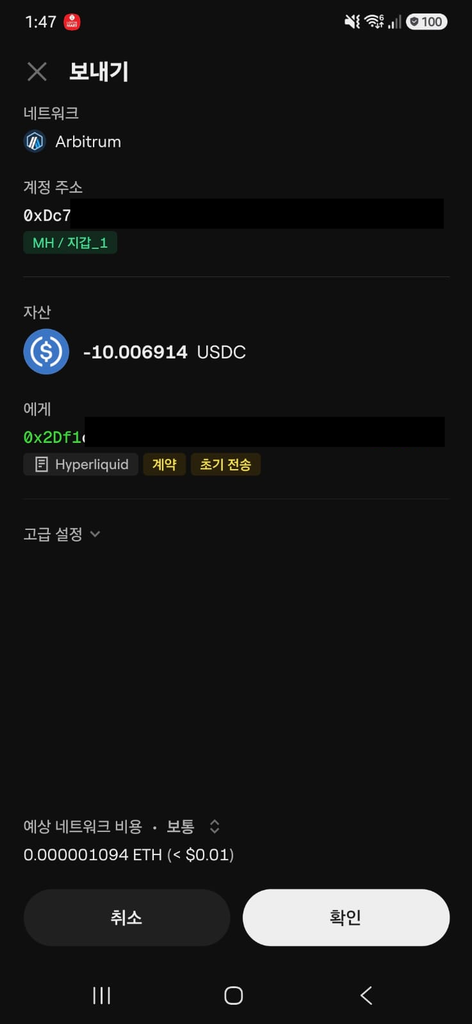
    OneKey showing a 10.006914 USDC transfer to Hyperliquid on Arbitrum

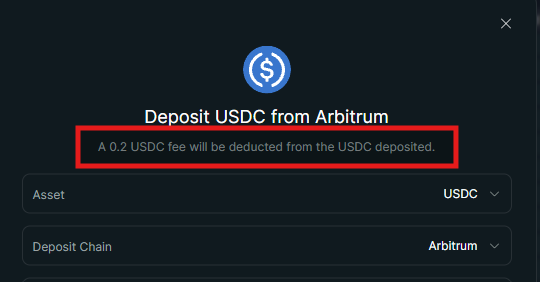
    During my test, the Hyperliquid interface displayed a 0.2 USDC deposit cost, and 9.8 USDC was reflected in my trading balance.

    That was what I observed during this particular test. I would not treat 0.2 USDC as a permanent or universal Hyperliquid deposit fee.

    I also encountered wallet signature and contract interaction screens during the process.

    Review these requests individually rather than treating them as routine confirmation buttons.


    8. I Also Tested Trading and Withdrawal

    I continued the experiment after the deposit.

    I opened a small BTC perpetual futures position and later withdrew funds back to OneKey.

    After a separate 2 USDC withdrawal test, my OneKey transaction history showed:

    +1.8 USDC received
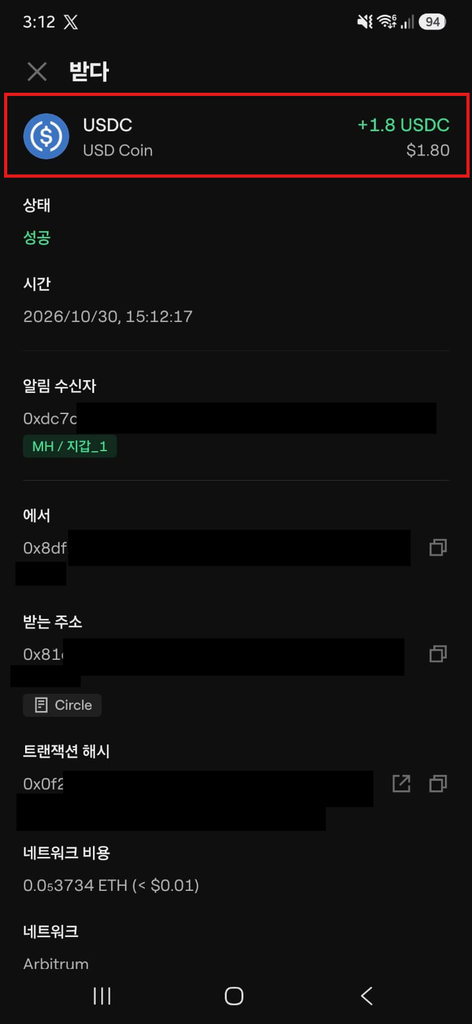
    OneKey showing 1.8 USDC received after a 2 USDC withdrawal from Hyperliquid

    I also encountered a separate one-time account activation charge during the first withdrawal process.

    Those costs belong to the Hyperliquid test, not to the earlier OneKey USDT0 → USDC swap.

    For the full deposit, trading fee, activation fee, and withdrawal breakdown:

    Hyperliquid Deposit, Trading Fees & Withdrawal: What I Actually Paid


    Frequently Asked Questions

    Can I swap USDT0 to USDC in OneKey?

    Yes. I completed a 445 USDT0 → USDC swap on Arbitrum through Binance Web3 inside OneKey.

    The available providers, quotes, and execution conditions can change, so check the live information in your own wallet.

    Why did my OneKey swap fail even though I had enough USDT0?

    My first CoW Swap route required an on-chain token approval, and I did not have enough ETH on Arbitrum for that step.

    Having enough of the token you want to swap does not necessarily mean you have enough of the network’s native token for every transaction.

    What does “Send Free” mean in OneKey?

    In my test, OneKey displayed “Send Free” during the Binance Web3 flow.

    OneKey provides gas sponsorship for certain eligible transactions, meaning it can cover the applicable network fee for that step.

    Check your own confirmation screen because eligibility can vary.

    Does OneKey Sponsored mean the swap is completely free?

    No.

    Gas sponsorship can cover an eligible network fee, but the swap can still involve exchange-rate differences, provider costs, price impact, or other transaction-related costs.

    Can I connect OneKey to Hyperliquid?

    Yes. I connected OneKey to Hyperliquid through WalletConnect during this test.

    Do I need ETH to swap on Arbitrum?

    It depends on the route and transaction.

    My CoW Swap approval required ETH and failed because my balance was insufficient. Another eligible transaction later showed OneKey’s sponsored “Send Free” option.

    Do not assume either outcome will apply to every swap.


    Final Thoughts

    My test started with 445 USDT0 and ended with 444.3212 USDC after the swap completed through Binance Web3.

    The more interesting part was what happened in between.

    The first CoW Swap route ran into an ETH gas problem. Another route showed OneKey’s sponsored fee option. And the amount I finally received was different from both earlier quotes.

    That is why I would not judge a wallet swap by a single advertised number.

    Check the route, check what the wallet is asking you to approve, and compare the live quote with what actually arrives.

    From there, I was able to connect OneKey to Hyperliquid through WalletConnect, deposit a small amount of USDC, trade, and withdraw back to the wallet.

    Check the route, check what the wallet is asking you to approve, and compare the live quote with what actually arrives.


    Tested October 29–30, 2026. Wallet interfaces, providers, sponsorship eligibility, fees, supported networks, and Hyperliquid deposit methods can change.

    Risk disclosure: This article documents my own test and is for educational purposes only. It is not financial advice. Crypto swaps and decentralized perpetual futures involve market, liquidation, smart-contract, wallet, and transaction risks.

    Affiliate disclosure: This draft currently contains no affiliate links. If compensated links are added later, they will be clearly disclosed.
  • Hyperliquid Fees 2026: Deposit, Trading & Withdrawal Costs

    Hyperliquid Fees 2026: Deposit, Trading & Withdrawal Costs

    Hyperliquid Fees 2026: What I Actually Paid to Deposit, Trade & Withdraw


    Tested with real funds: October 30, 2026 · Fees last checked: October 31, 2026

    If you’re using Hyperliquid for the first time, the process looks simple: connect a wallet, deposit funds, trade, and withdraw.

    But the fees aren’t always as straightforward.

    I tested the full process with my own funds — from depositing USDC to placing a BTC perpetual trade and withdrawing back to my wallet.

    Here’s what I actually paid, what appeared in the Hyperliquid interface, and where the costs can differ depending on the route you use.

    Quick Answer

    In my test:

    • Deposit: 10 USDC → 9.8 USDC credited
    • Deposit fee shown: 0.2 USDC
    • BTC trade value: $67.95
    • Trading fee: 0.01 USDC
    • First withdrawal: 2 USDC requested → 1.8 USDC received
    • First outbound action: an additional one-time $1 account activation charge appeared
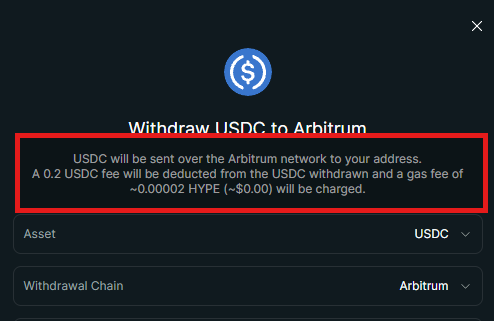
    • Withdrawal UI checked later: 0.2 USDC + approximately 0.00002 HYPE gas

    Hyperliquid’s USDC deposit and withdrawal infrastructure has been changing, so these should be treated as real test results — not permanent fee guarantees. Check the fee shown in your own interface before confirming a transfer.


    What I Tested

    This was a real-money test, not a simulated walkthrough.

    I used my own account and funds to:

    • Connect an EVM wallet
    • Enable trading
    • Deposit USDC
    • Open a BTC perpetual position
    • Check the trading fee
    • Withdraw USDC back to my wallet

    For this test, I used OneKey as my wallet and connected it directly to the official Hyperliquid web interface through WalletConnect.

    OneKey is not required to use Hyperliquid. Other compatible EVM wallet options are available.

    I’ll cover the OneKey side separately, including why I had to convert my original Arbitrum USDT0 into USDC before this test.


    1. Connect Your Wallet to Hyperliquid

    Open the official Hyperliquid app and select Connect.

    I connected OneKey through WalletConnect.

    Once connected, Hyperliquid displays the wallet address in the interface.

    Connecting a wallet allows it to interact with the application, but you should still carefully review each signature or transaction request before approving it.

    Security note

    Never enter your seed phrase or private key into Hyperliquid or any website claiming it is required for wallet connection.

    Your recovery phrase can provide control over your wallet and should remain private.


    2. Enable Trading

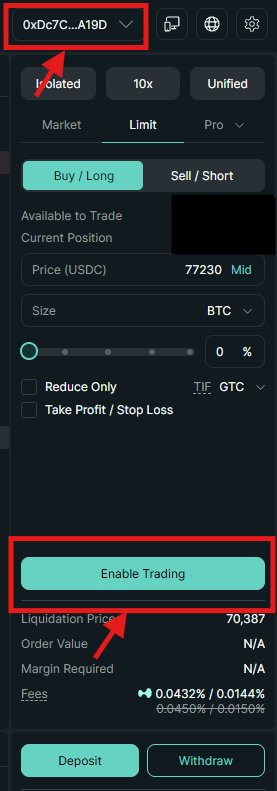
    After connecting my wallet, Hyperliquid displayed an Enable Trading button.

    This is separate from simply connecting the wallet.

    Hyperliquid’s onboarding documentation describes this step as requiring a gas-less signature when using a DeFi wallet.

    I selected Enable Trading, approved the request in my wallet, and the account was ready to use.


    3. Deposit USDC

    The exact asset and network matter when depositing.

    Hyperliquid has used Arbitrum USDC as an important deposit route, while its USDC infrastructure has also been moving toward Circle CCTP-based deposits.

    The route available to you can depend on the current Hyperliquid interface and login/deposit method.

    What happened in my test

    I deposited:

    10 USDC

    Hyperliquid displayed a:

    0.2 USDC deposit fee


    The amount credited to my Hyperliquid account was:

    9.8 USDC

    So the result matched the fee shown before confirmation.

    Before you deposit

    Check:

    1. The network shown in your Hyperliquid deposit window
    2. The exact stablecoin being deposited
    3. The fee shown before confirmation
    4. Whether your wallet needs a native gas token
    5. Any minimum deposit requirement for the route you are using

    For example, Hyperliquid documentation for the legacy Arbitrum bridge specifies a 5 USDC minimum deposit, while other routes can have different conditions.

    In my case, preparing the funds was actually more complicated than depositing them.

    I originally held USDT0 on Arbitrum, while the route I was testing required USDC. I converted the funds before depositing.

    I’ll cover that process in the separate OneKey guide.


    4. Hyperliquid Trading Fees

    Hyperliquid does not charge every user the same trading rate.

    Fees can depend on factors such as:

    • Rolling 14-day trading volume
    • Maker or taker execution
    • Referral discounts
    • Staking-based discounts

    At the base perpetuals tier, Hyperliquid lists:

    Order typeBase fee
    Taker0.045%
    Maker0.015%

    Higher-volume users can qualify for lower rates.

    What my account showed

    My account displayed:

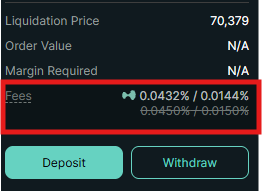
    Taker: 0.0432%

    Maker: 0.0144%

    My account had an active 4% referral fee discount, which explains the difference from the base rates:

    0.045% × 0.96 = 0.0432%

    0.015% × 0.96 = 0.0144%

    Hyperliquid’s referral documentation states that referred users can receive a 4% fee discount for their first $25 million in trading volume.


    Try Hyperliquid

    Get a 4% referral fee discount with code: DPLTOOLS

    Trade on Hyperliquid with My Referral Link

    Disclosure: This is my referral link. I may receive a referral reward if you use it.


    5. My Real BTC Perpetual Trade

    Next, I placed a small BTC perpetual limit order to see what Hyperliquid actually charged.

    ItemMy test
    Entry price$78,100
    Position size0.00087 BTC
    Position value$67.95
    Leverage10× isolated
    Trading fee shown0.01 USDC

    The order filled and my trade history recorded a 0.01 USDC fee.

    That does not mean every $67.95 trade will cost exactly 0.01 USDC.

    The final fee depends on the trade’s notional value, execution type, fee tier and applicable discounts.

    I did not independently verify the maker/taker classification of this particular fill, so I’m reporting the 0.01 USDC fee as the directly observed result, rather than inferring the execution type from the fee alone.

    A note on leverage

    I used 10× isolated leverage for this small test.

    That was part of the test setup, not a trading recommendation. Leveraged perpetuals can amplify losses and introduce liquidation risk.


    6. Withdraw USDC

    After trading, I tested withdrawing USDC back to my wallet.

    The basic process was:

    1. Select Withdraw
    2. Check the withdrawal network or route
    3. Enter the amount
    4. Review the displayed fee
    5. Confirm the withdrawal

    This is one area where different Hyperliquid guides may show different numbers because multiple withdrawal mechanisms and documentation from different stages of the platform can coexist.

    What the current interface showed when I checked

    When I later checked the English withdrawal interface, it displayed:

    0.2 USDC

    plus approximately:

    0.00002 HYPE in gas

    The displayed HYPE gas value was approximately $0.00 at the time.

    This is the fee shown in the interface I checked — not a claim that every Hyperliquid withdrawal always costs exactly this amount.


    7. Why Did My First Withdrawal Have an Extra $1 Charge?

    My first withdrawal had one additional cost.

    I requested:

    2 USDC

    My OneKey wallet received:

    1.8 USDC

    Hyperliquid also displayed a separate $1 stablecoin account activation gas charge during that first outbound action.

    This charge did not appear again when I later checked the withdrawal flow.

    Hyperliquid’s documentation explains that a new HyperCore account can incur a one-time 1 quote-token activation gas fee on its first outbound action.

    That matches what I observed during my test.

    So this $1 should not be treated as the normal recurring withdrawal fee.

    It was a one-time account activation cost associated with the first outbound action.


    8. What Did I Actually Pay?

    Here are the directly observed results from my test.

    ActionWhat I observed
    Deposit requested10 USDC
    Deposit fee shown0.2 USDC
    Balance credited9.8 USDC
    BTC trade value$67.95
    Trading fee0.01 USDC
    First withdrawal requested2 USDC
    Amount received in OneKey1.8 USDC
    First outbound activation charge$1, one time
    Withdrawal UI checked later0.2 USDC + small HYPE gas

    I would not combine these into a single “Hyperliquid costs X dollars” number.

    They represent different actions, and the $1 activation charge is a one-time event rather than a recurring trading or withdrawal fee.

    The useful distinction is:

    My test result tells you what happened to my account. The live confirmation screen tells you what your transaction is about to cost.


    9. What Was Actually Difficult?

    For me, Hyperliquid’s trading interface was not the hardest part.

    The bigger friction was getting the funds into the correct asset + network + route before depositing.

    I started with USDT0 on Arbitrum, but the route I tested required USDC.

    That matters because USDT, USDT0 and USDC are different tokens even though they are all designed to track the U.S. dollar.

    The network matters too.

    For a first-time user, I would verify the exact asset and network shown in the deposit interface before moving a meaningful amount.

    I’ll show exactly how I converted USDT0 to USDC on Arbitrum in my separate OneKey guide.


    Common Questions

    My wallet is connected. Why can’t I trade?

    Check whether you completed the Enable Trading step.

    Connecting the wallet and enabling trading are separate actions for a DeFi wallet workflow.

    Can I deposit USDT instead of USDC?

    Do not assume that one stablecoin can simply be sent in place of another.

    Check the assets and routes currently offered in your Hyperliquid deposit interface.

    If you hold a different stablecoin, you may need to convert it or use another supported route.

    Do I need ETH for gas?

    It depends on the route.

    A wallet-side Arbitrum transaction can require native gas, while other routes or sponsored wallet transactions can behave differently.

    Check the transaction request shown by your wallet before approving it.

    Why do some Hyperliquid fee guides mention a $1 withdrawal fee?

    Hyperliquid has used different USDC transfer mechanisms, and older documentation or guides may describe legacy Arbitrum bridge behavior.

    Separately, a new HyperCore account can incur a one-time 1 quote-token activation fee on its first outbound action.

    These are not necessarily the same charge.

    Check the route and fee displayed by your own interface before confirming.

    Is OneKey required?

    No.

    I used OneKey because it was the wallet in my test setup.

    The next guide will explain why I used it, how I converted Arbitrum USDT0 to USDC, and what happened when I initially had no ETH available for gas.


    Is Hyperliquid Easy for Beginners?

    Once my funds were prepared correctly, I found the core workflow relatively straightforward.

    The confusing part was everything around the trade:

    • Which stablecoin?
    • Which network?
    • Which deposit route?
    • Do I need gas?
    • Why does another guide show a different fee?
    • What am I signing in my wallet?

    If you already understand wallets, networks and stablecoins, the interface itself is fairly direct.

    If you don’t, using a small test amount first can help you verify the route — while still respecting any minimum deposit requirement shown by Hyperliquid.


    Bottom Line

    In my real-money test, I successfully connected a wallet, deposited USDC, enabled trading, opened a BTC perpetual position and withdrew funds back to my wallet.

    The key lesson wasn’t simply that Hyperliquid was “cheap.”

    It was that different actions can have different costs, and those costs can depend on the route and account state.

    In my test:

    • 10 USDC deposited → 9.8 USDC credited
    • 0.01 USDC trading fee on my $67.95 BTC trade
    • 2 USDC first withdrawal → 1.8 USDC received
    • A separate one-time $1 activation charge appeared on the first outbound action
    • A later withdrawal screen displayed 0.2 USDC + a small HYPE gas charge

    Those are real observations from my account, not permanent fee guarantees.

    For any transfer, check the live fee and route shown by Hyperliquid before confirming.

    Next: How I used OneKey to convert Arbitrum USDT0 into USDC and prepare the funds for this


    Disclosure: This article documents my own test and is provided for educational purposes. It is not financial advice. Crypto transfers and leveraged trading involve risks, including incorrect network selection, wallet mistakes, smart-contract risk, liquidation and market losses. This article contains a referral link. I may receive a referral reward if you use it, at no additional cost to you.